In this article, I would like to talk about my understanding of Apache Cassandra database and how to use it with Spring Boot. We will cover below topics,
- Introduction to Cassandra database & when to use it
- Run Cassandra with Docker and access it from Spring Boot application
1. Introduction to Cassandra database & when to use it
Apache Cassandra is a distributed NoSQL database.
In a distributed database, data is stored in multiple nodes available in a cluster. Nodes communicate with each other for replicating the data & keeping the data in sync. It allows the database to scale horizonatally(add or delete nodes) & be highly available(data is replicated in multiple nodes).
If there is an error in communication between nodes(network partition occurs), then a distributed database should choose between the two guarantees given below(as per CAP Theorem),
- Consistency - System should return latest data on every read query
- Availability - System should continue accepting read and write queries
By design, Cassandra prioritizes Availability over Consistency. It will continue accepting writes and synchronize the data at a later point. Note: If necessary, it is possible to adjust the consistency level for a query, by waiting for all nodes to respond.
In simple terms, writes or updates in Cassandra are sequentially appended to a table in disk instead of finding the row through random i/o & update it in place like relational databases. This makes Cassandra suitable for applications with high write throughput.
Each node in a cluster performs similar function. There is no concept of master node for write queries and replica nodes for read only queries like Postgres. When a query is issued, the request goes to any random node & it will figure out which node owns the data based on partition key. This peer-to-peer design eliminates single point of failure. It makes it highly available database.
How data is organized?
In relational database sytems, we have a database which contains multiple tables. In Cassandra, we have a keyspace which can contain multiple tables. We can do configuration like replication strategy at a keyspace level.
A table in Cassandra is similar to a table in relational databases. It’s a container for rows of data. However, Cassandra doesn’t support queries on multiple tables so we dont have concepts like foreign key or joins. So, we need to create tables based on what query the application needs & all the required data are denormalized & kept in one table.
Cassandra Query Language(CQL), an alternative to SQL, is used to query the data from tables.
Here is the sample schema for storing transaction data in a Credit Card application. We will use the same schema for the sample application.
CREATE KEYSPACE transactions
    WITH replication = {'class':'SimpleStrategy','replication_factor':1};

CREATE TABLE transactions.event (
    account_id      UUID,
    event_id        UUID,
    event_timestamp timestamp,
    event_type      TEXT,
    amount          DECIMAL,
    description     TEXT,
    PRIMARY KEY (account_id, event_timestamp, event_id)
) WITH CLUSTERING ORDER BY (event_timestamp DESC, event_id ASC);
Partition Key is used to distribute the data in all the nodes present in the cluster. The first field provided in the primary key is the partition key.
The other two fields in the primary key definition is the Clustering Key. It will help to order the data inside a partition.
Consider the table event in which account_id, event_timestamp and event_id is the composite primary key. The first field account_id is hashed to generate the partition key.
All the events for an account would be in the same partition. The entire partition for that account will be stored on a single node(each node can store many partitions).
When we query based on an account, a function called Partitioner is called to compute the hash value of the partition key. Using this hash value, the partition and node where the data for the account resides is determined. Withing the partition,, clustering key is used to search the result faster. As a result of this, even the database scales, the retrieval time is constant & fast.
Unlike traditional relation databases, the queries are restricted. If Cassandra is not able to determine the partition(when we dont supply partition key), it doesn’t know which node the data resides in and it needs to scan all the nodes. So, instead of constant retrieval time, query performance will be proportional to the total amount of data available. As the cluster size grows, the query will perform worse.
So, if we have an use case where the application needs to support higher number of writes & it follows a predictable query pattern then Apache Cassandra database is a good choice.
2. Run Cassandra with Docker and access it from Spring Boot application
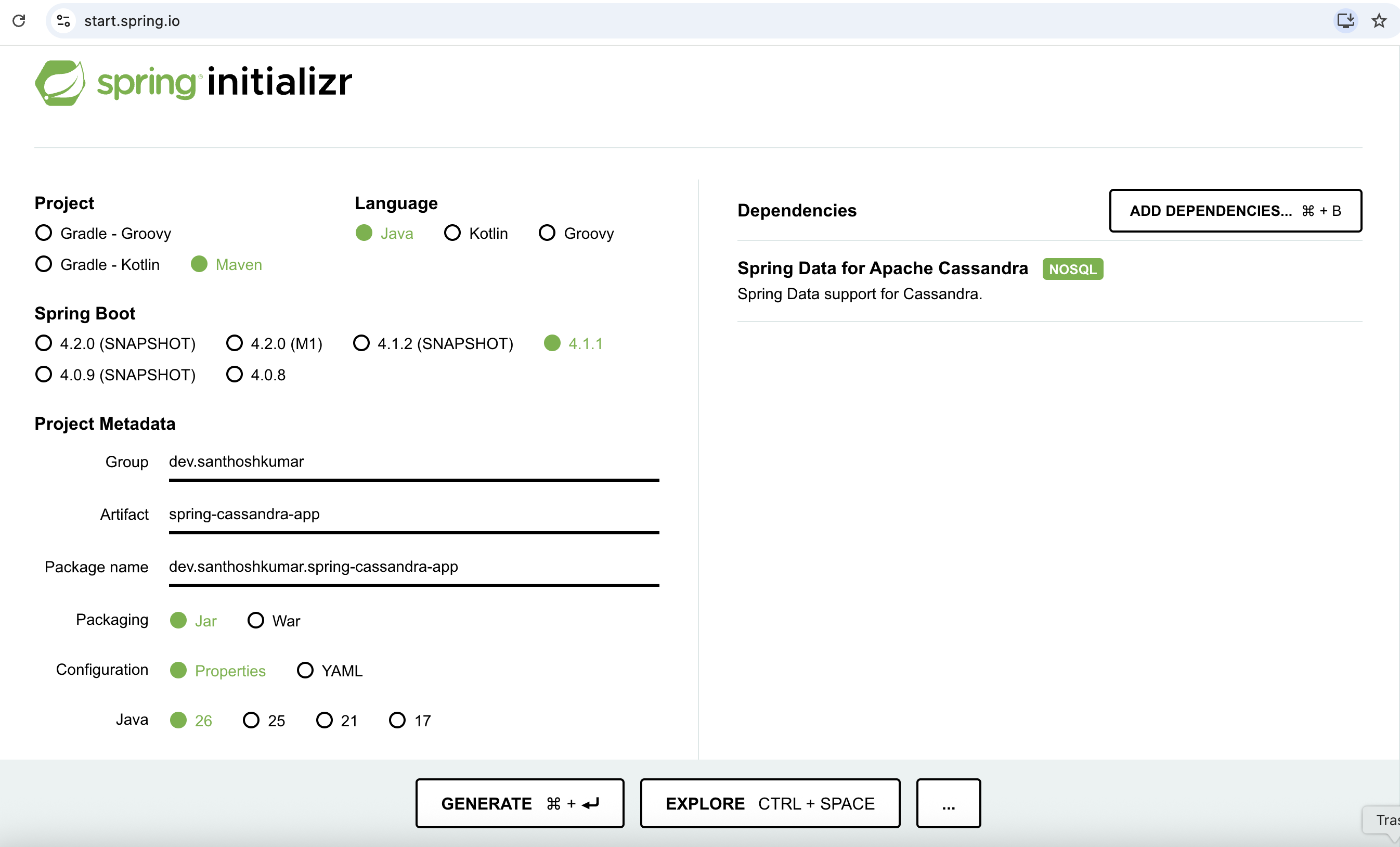
Let’s build a simple application. Go to Spring Initializr, add Spring Data for Apache Cassandra dependency and generate the sample project & open it in IDE.
Before writing application code, let’s setup cassandra database locally using Docker.
Let’s write a schema.cql file with below contents to create sample keyspace and table & place it under src/main/resources directory.
CREATE KEYSPACE IF NOT EXISTS transactions
    WITH replication = {'class':'SimpleStrategy','replication_factor':1};


CREATE TABLE IF NOT EXISTS transactions.event (
                                                  account_id      UUID,
                                                  event_id        UUID,
                                                  event_timestamp TIMESTAMP,
                                                  event_type      TEXT,
                                                  amount          DECIMAL,
                                                  description     TEXT,
                                                  PRIMARY KEY (account_id, event_timestamp, event_id)
    ) WITH CLUSTERING ORDER BY (event_timestamp DESC, event_id ASC);

CREATE ROLE IF NOT EXISTS transaction_user
    WITH PASSWORD = 'tx123'
     AND LOGIN = true;

GRANT ALL PERMISSIONS ON KEYSPACE transactions TO transaction_user;
The columns event_timestamp and event_id are the clustering keys. It’s used to sort the data within a partition. Based on above definition, when we query based on account_id, we get newest transactions first.
Now, let’s write a docker-compose.yml file & keep it in the root of the project. It will run a Cassandra database & initialize it with keyspace & table.
version: "3.8"

services:
  cassandra:
    image: cassandra:5.0
    container_name: cassandra
    ports:
      - "9042:9042"
    environment:
      CASSANDRA_AUTHENTICATOR: PasswordAuthenticator
      CASSANDRA_AUTHORIZER: CassandraAuthorizer
      CASSANDRA_CLUSTER_NAME: DemoCluster
    healthcheck:
      test: ["CMD-SHELL", "cqlsh -u cassandra -p cassandra -e 'DESCRIBE KEYSPACES' || exit 1"]
      interval: 15s
      timeout: 10s
      retries: 30

  cassandra-init:
    image: cassandra:5.0
    depends_on:
      cassandra:
        condition: service_healthy
    volumes:
      - ./src/main/resources/schema.cql:/schema.cql:ro
    entrypoint: >
      sh -c "
      cqlsh cassandra -u cassandra -p cassandra -f /schema.cql &&
      echo 'Cassandra initialized'
      "
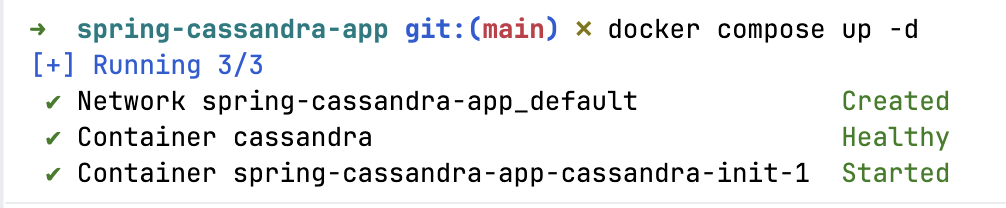
We can now run the command docker compose up -d in the the root of the project to bring up Cassandra databaase(wait for the container to be healthy). To bring the containers down, run the command docker compose down
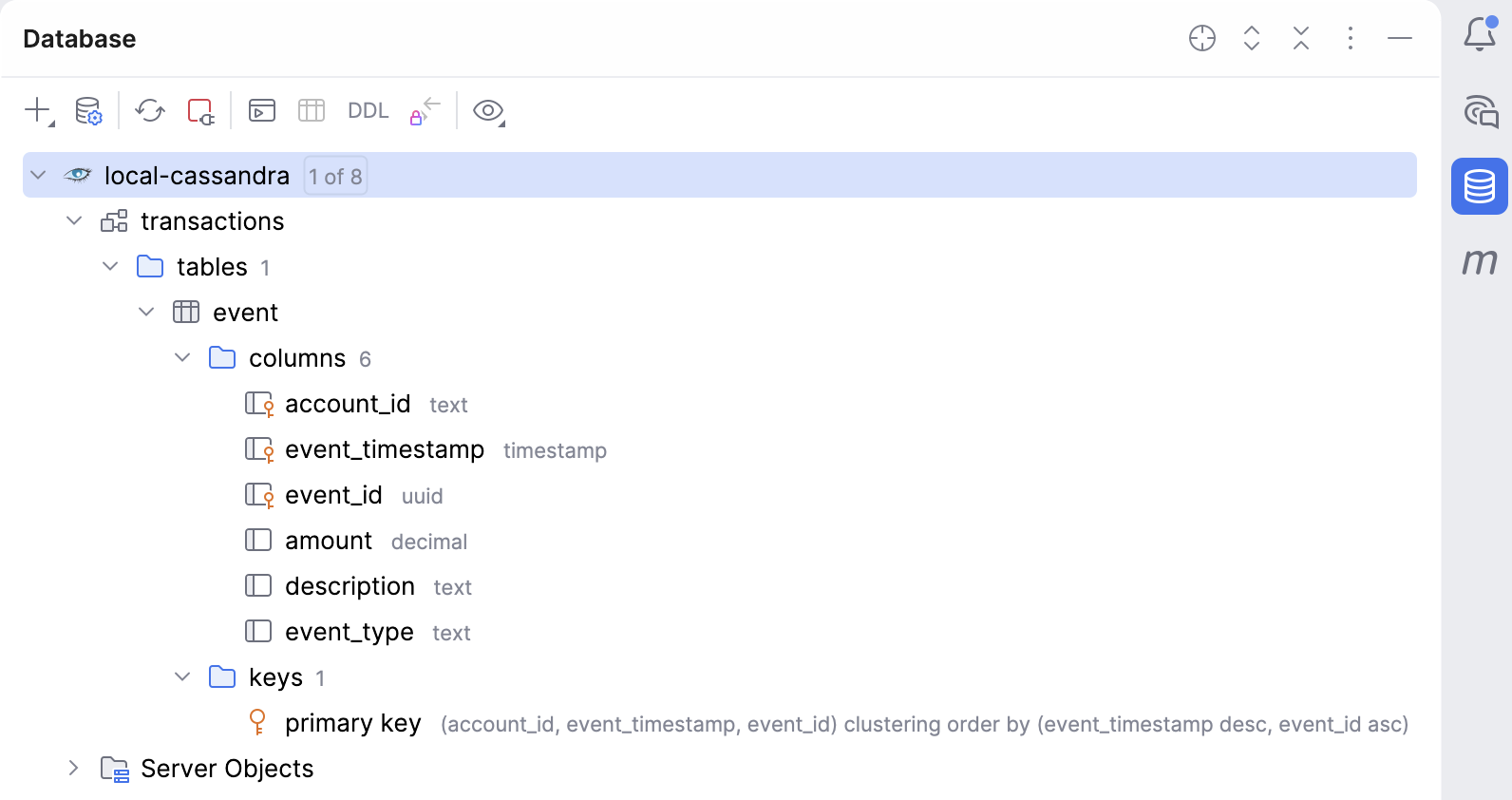
We can verify by adding Cassandra Datasource using IntelliJ Database viewer(or some other editor) with the URL jdbc:cassandra://localhost:9042/transactions, User transaction_user and Password tx123(mentioned in schema.cql file).
With our database up & running(with necessary keyspace and table), let’s now write some simple application code to access the database.
We use Spring Data for Apache Cassandra library to access Cassandra database.
As a first step, let’s configure the application to connect to the cassandra database by defining the connection parameters. To connect to our Cassandra running on localhost, add the below properties in the application.properties file.
spring.cassandra.local-datacenter=datacenter1
spring.cassandra.contact-points=localhost
spring.cassandra.port=9042
spring.cassandra.keyspace-name=transactions
spring.cassandra.username=transaction_user
spring.cassandra.password=tx123

spring.cassandra.schema-action=NONE
spring.cassandra.contact-points is the cassandra server’s ip address or host names
spring.cassandra.port is the port to connect to
spring.cassandra.keyspace-name is the keyspace name to use for connection session
spring.cassandra.username is the username to connect to cassandra host(we are using application user as mentioned in schema.cql file)
spring.cassandra.password is the password to connect to cassandra host
To keep it simple we are not using any schema generation by spring entity objects. Typically we dont create the tables during application startup so trying to follow that pattern here by externalizing the table initialization.
spring-boot-starter-data-cassandra is the starter for using Cassandra distributed database and Spring Data Cassandra(It brings in datastax cassandra driver).
Since we have added this jar, Spring Boot auto-configuration will setup all the beans required for us. It uses CassandraProperties to bind the properties declared in application.properties file with spring.cassandra prefix & uses CassandraAutoConfiguration to create CqlSession which is the cassandra datastax driver level connection.
Here’s a simple domain EventKey and Event class to store and read data from Cassandra.
package dev.santhoshkumar.spring_cassandra_app;

import org.springframework.data.cassandra.core.cql.Ordering;
import org.springframework.data.cassandra.core.cql.PrimaryKeyType;
import org.springframework.data.cassandra.core.mapping.PrimaryKeyClass;
import org.springframework.data.cassandra.core.mapping.PrimaryKeyColumn;

import java.time.Instant;
import java.util.Objects;
import java.util.UUID;

@PrimaryKeyClass
public class EventKey {

    @PrimaryKeyColumn(name = "account_id", type = PrimaryKeyType.PARTITIONED)
    private UUID accountId;

    @PrimaryKeyColumn(name = "event_timestamp", type = PrimaryKeyType.CLUSTERED,
            ordering = Ordering.DESCENDING)
    private Instant eventTimestamp;

    @PrimaryKeyColumn(name = "event_id", type = PrimaryKeyType.CLUSTERED)
    private UUID eventId;

    public EventKey(UUID accountId, Instant eventTimestamp, UUID eventId) {
        this.accountId = accountId;
        this.eventTimestamp = eventTimestamp;
        this.eventId = eventId;
    }

    // getters, equals, hashCode and toString
}
package dev.santhoshkumar.spring_cassandra_app;

import org.springframework.data.cassandra.core.mapping.Column;
import org.springframework.data.cassandra.core.mapping.PrimaryKey;
import org.springframework.data.cassandra.core.mapping.Table;

import java.math.BigDecimal;

@Table("event")
public class Event {

    @PrimaryKey
    private EventKey key;

    @Column("event_type")
    private String eventType;

    private BigDecimal amount;

    private String description;

    public Event(EventKey key, String eventType, BigDecimal amount, String description) {
        this.key = key;
        this.eventType = eventType;
        this.amount = amount;
        this.description = description;
    }

    // getters and toString
}
We annotate the class with @Table to indicate it’s a Cassandra Entity. Since we are using a composite primary key a separate class is used. EventKey class should implement sensible equals & hashcode methods(generated by IDE or lombok works).
Next, let’s define a Spring Data repository interface. As type arguments, we provide the entity class and entity id. This will generate query implementations that we can use. This repository delegates the actual insert to underlying CassandraTemplate for object to table mapping. These beans were created as part of auto configuration.
Like traditional spring data repository, queries are derived from the method names.
package dev.santhoshkumar.spring_cassandra_app;

import org.springframework.data.cassandra.repository.CassandraRepository;
import org.springframework.data.cassandra.repository.Query;

import java.util.List;
import java.util.UUID;

public interface EventRepository extends CassandraRepository<Event, EventKey> {

    List<Event> findAllByKeyAccountId(UUID accountId);

    @Query(allowFiltering = true)
    List<Event> findByEventType(final String eventType);
}
In Event class, we have the variable key of type EventKey as the Primary Key. EventKey class contains the variable accountId which is the partition key.
So, when defining the method name, use the name of the property key & append the property accountId resulting in findAllByKeyAccountId.
The method findByEventType is not recommended in Cassandra. The performance of this query will get worse as the cluster scales as the query needs to hit every node in the cluster.
We can now use the repository to insert or read data as shown below. Run the spring boot application to verify.
package dev.santhoshkumar.spring_cassandra_app;

import org.slf4j.Logger;
import org.slf4j.LoggerFactory;
import org.springframework.boot.CommandLineRunner;
import org.springframework.boot.SpringApplication;
import org.springframework.boot.autoconfigure.SpringBootApplication;
import org.springframework.context.annotation.Bean;

import java.math.BigDecimal;
import java.time.Instant;
import java.util.UUID;

@SpringBootApplication
public class SpringCassandraAppApplication {

	private final static Logger log = LoggerFactory.getLogger(SpringCassandraAppApplication.class);


	public static void main(String[] args) {
		SpringApplication.run(SpringCassandraAppApplication.class, args);
	}

	@Bean
	public CommandLineRunner commandLineRunner(EventRepository eventRepository) {
		return args -> {
			UUID accountId = UUID.randomUUID();

			EventKey eventKey1 = new EventKey(accountId, Instant.now(), UUID.randomUUID());
			Event firstTransaction = new Event(eventKey1,
					"PURCHASE", BigDecimal.TEN, "Costco");

			Event secondTransaction = new Event(new EventKey(accountId, Instant.now(), UUID.randomUUID()),
					"PURCHASE", new BigDecimal("24.50"), "Walmart");
			Event thirdTransaction = new Event(new EventKey(accountId, Instant.now(), UUID.randomUUID()),
					"PURCHASE", new BigDecimal("500.00"), "Target");

			eventRepository.save(firstTransaction);
			eventRepository.save(secondTransaction);
			eventRepository.save(thirdTransaction);

			eventRepository.findById(eventKey1)
							.ifPresent(e -> log.info("Lookup by primary key : {}", e));

			eventRepository.findAllByKeyAccountId(accountId)
					.forEach(transaction -> log.info("Lookup by partition key: {}", transaction));

			eventRepository.findByEventType("PURCHASE")
					.forEach(transaction -> log.info("Lookup by random column: {}", transaction));
		};
	}
}
Summary
In this post, I explained about my understanding of Apache Cassandra database and how to use it with Spring Boot in a simple application.
The code used is available in my Github.